

You built the content. You earned the ranking. And then Google dropped an AI-generated summary right above your result and took the click.
That's the reality of search right now.
AI overviews have fundamentally changed what it means to rank well. Position one used to guarantee a 28-35% click-through rate. Today, when a Google AI Overview appears on that same query, CTR drops to 12-15%. That's a 58% decline, and it's not a bug. It's the new default.
But here's what most SEOs are missing.
Being cited inside an AI Overview is a completely different game from just ranking in the ten blue links below it. And the brands that understand that difference are pulling away from everyone else right now.
This guide gives you the exact playbook to stop losing traffic to AI-generated answers and start winning clicks whether you're cited or not.
What AI Overviews Are Actually Doing to Your Traffic
Before you fix anything, you need to understand what you're actually dealing with.

Seer Interactive studied 53 brands, 5.47 million queries, and 2.43 billion impressions from January 2025 to February 2026. The findings were stark.
When a Google AI Overview appears on a query:
- Pages cited inside it: ~2.1% CTR
- Pages not cited on the same results page: ~0.9% CTR
- Queries with no AI Overview at all: ~3.3% CTR
Read that again. If you rank on page one but you're not cited in the AI Overview, you're getting 0.9% CTR. That's a near-invisible result even at a strong position.
But here's the good news hidden in that data. Queries without AI overviews climbed from 2.8% CTR in early 2025 to 3.8% by February 2026. The people who still click when there's no AI Overview are more qualified. They want depth. They're not looking for a quick answer.
And when your brand does get cited? Brands cited in AI overviews earn 35% more organic clicks and 91% more paid clicks than uncited results on the same page.
One AI citation can generate more traffic than ranking at position three.
Front-End CTR: Title Tags, Meta Descriptions, and Rich Snippets
Before a user ever reads your content, they make a split-second decision based on what they see on the results page. Your title tag, meta description, and rich snippet are doing all the selling at that moment. This section covers how to make that first impression impossible to scroll past.
Master the Authority-Benefit Title Formula
Your title tag is still the single most valuable piece of real estate you own on the search results page. Weak titles are leaving CTR on the table regardless of your ranking position.
The formula that consistently outperforms today combines four elements: Primary Keyword + Current Year + Benefit or Promise + Authority Signal. In practice that looks like: "Health Tips 2026: Boost Energy Naturally | Doctor Approved." The keyword tells Google what the page is about. The year signals freshness. The benefit tells the user what they get. The authority signal tells them why they should trust it.
A few mechanics worth getting precise about. Aim for 50-55 characters, which translates to roughly 512 pixels of display width. Google truncates titles beyond that threshold and a cut-off title loses impact fast. Front-load your most compelling information into the first 25 characters because that is what gets scanned first in a dense results page.
Use terms likely to match the user's exact query. Google bolds matching words in your title on the results page, and that bolding can increase CTR by drawing the eye directly to your result.
Power words earn their place when used honestly. Authority triggers like "proven," "expert," and "tested" build trust. Curiosity triggers like "surprising," "revealed," and "inside" create an open loop the user wants to close. Urgency triggers like "now," "today," and "latest" tap into the fear of missing out. Use them where they fit naturally and mean what they say. A promise the page does not deliver on destroys trust and tanks dwell time, which hurts rankings over time.
Craft High-Conversion Meta Descriptions
Most meta descriptions summarize the page. That is the wrong job. A meta description should sell the click.
The conversion formula is: Clear Benefit + Supporting Detail + Call to Action + Bonus. The bonus is the underused element. Adding something like "get a free checklist" or "includes a free template" at the end gives the user a reason to click that competitors who are only summarizing their content simply do not offer.
Here is what that looks like in practice. A page about women's health tips might read: "These doctor-approved tips show you how to boost energy naturally with simple daily habits. Start today and grab a free nutrition guide." The benefit is clear in the first sentence. The CTA is direct. The bonus closes it.
Use active verbs throughout. "Calculate your savings," "compare options," and "download the guide" are specific and action-oriented in a way that "learn more" is not. Keep the full description under 160 characters and put your most important information in the first half, because Google sometimes truncates from the middle on mobile.
Use Structured Data to Earn Rich Snippets
Rich snippets change what your result looks like on the page. Star ratings, FAQ dropdowns, how-to steps, and product prices appearing directly in the search result make your listing physically larger and more informative than a standard blue link. That visual difference drives clicks.
FAQ schema is the highest-leverage implementation for most content sites. It creates interactive dropdown questions directly on the results page, answers questions before the user clicks, and takes up significantly more vertical space than a standard result. FAQ and HowTo schema together can increase CTR by giving users more information upfront and making your result impossible to miss.
Speakable schema is the implementation almost no one is using. It identifies specific sections of your content as suitable for voice readout and direct AI quotation. Only about 8% of sites have implemented it, which means adding it now is a genuine competitive edge. It tells AI assistants exactly which parts of your page to quote, making citation far more likely.
Always use the JSON-LD format. It is the easiest for AI systems to parse, Google's recommended standard, and the cleanest to implement without touching your page's HTML structure.
Target Queries Where AI Overviews Don't Trigger
Not every query shows an AI Overview. And the queries that don't are becoming more valuable, not less.
Queries without AI overviews climbed from 2.8% CTR in early 2025 to 3.8% by February 2026. The users clicking on those results are more qualified. They want depth. They are not looking for a quick answer that a summary can satisfy.
Use Google Search Console to identify keywords in your niche where AI Overviews are not consistently triggering. Sort by impressions, then manually check your top queries in Google search to see which ones show an AIO and which ones don't. The ones without AIOs are your highest-value direct click opportunities right now.
Transactional queries show AI overviews only about 5% of the time. Long-tail queries of four or more words are also significantly less likely to trigger them because the AI struggles to synthesize a satisfying answer to a highly specific question. A query like "content marketing strategy for B2B SaaS companies with small teams" leaves far more room for a direct click than "content marketing strategy" does.
Prioritize these queries alongside your citation-building work. They are the most reliable path to direct CTR improvement while the AI Overview landscape continues to shift.
Back-End CTR: Getting Cited and Converting the Click
Getting the click is only half the battle. The other half is making sure your content shows up inside the AI-generated summary sitting above your organic result.
This section covers how to structure, markup, and position your content so AI models cite you by default.
The Core Principle: Extractable Beats Well-Written
Here's the truth about AI overviews. They don't reward the best-written content. They reward the most extractable content.
Google's AI is scanning your page looking for clean, direct answers it can pull out and serve to users without sending them anywhere. Your job is to write content that makes that pull easy, while giving enough context that the user still needs to click through for the full picture.
That's the tension you're managing. Make it easy for the AI to cite you. Make it impossible for the user to stop at just the citation. This AI overview case study showed exactly how that plays out in practice.
The framework breaks into five levers: answer architecture, schema markup, brand signals, and content that AI cannot replace. Each one matters. Miss any of them and you're leaving citations on the table.
Lever 1: Answer Architecture
AI models excel at summarizing baseline facts. They struggle with nuance, proprietary data, and anything that requires context to understand.
Your content needs both.
The Answer Capsule: Your New Content Unit
The foundation of answer architecture is the answer capsule. Every major section of your article should open with a 40-60 word direct answer that can stand completely alone as a citable unit. Write it so that if the AI pulled it out of context and dropped it into a summary, it would still make perfect sense to the reader.
Here is what that looks like in practice.
Instead of this opener: "There are many different ways to think about click-through rate in the context of modern search..."
Write this: "Click-through rate measures the percentage of users who click your result after seeing it in search. When a Google AI Overview appears on a query, organic CTR drops by an average of 61% for informational queries. Pages not cited in the AI Overview receive only 0.9% CTR, even from a page-one position."
That version gives the AI a clean, quotable capsule. It also gives the reader a reason to keep going.
How to Structure the Inverted Pyramid
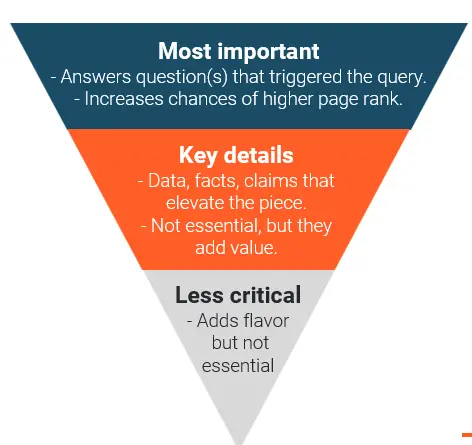
After the answer capsule, follow the inverted pyramid structure. Every section has three layers, and the order matters.
- Start with the direct answer. One or two sentences, no preamble, no warm-up. Just the answer. This is what the AI pulls to cite you.
- Back it immediately with proof. A stat, a data point, a specific finding. This validates the answer for the reader and gives the AI something concrete to work with.
- Then expand into depth. Examples, nuance, caveats, case studies, the "why behind the what." This is the layer the AI cannot summarize cleanly, which makes it the reason the reader needs to click through to your page in the first place.
Here is what that looks like in practice using CTR as the topic: "Organic CTR drops by 61% when a Google AI Overview appears on a query." That is the direct answer. "Seer Interactive confirmed this across 5.47 million queries studied between January 2025 and February 2026." That is the proof.
Then comes the depth: the drop is not evenly distributed. Informational queries are hit hardest. Branded queries see almost no impact. Which means the real question is not how to avoid AI overviews. It is how to get inside them.
That third layer is what the reader clicked for. Give it to them fast.
For key answer blocks, target 134-167 words. Research on AI extraction patterns shows this range is the sweet spot for synthesis. Long enough to contain real substance, short enough to be pulled cleanly as a single unit.
Writing Information Islands
Beyond the opening, design each paragraph as an information island. Every paragraph should be semantically complete on its own.
A reader, or an AI crawler, should be able to pull any single paragraph out of your article and understand it fully without needing the surrounding sentences for context. If a paragraph only makes sense in sequence with the one before it, rewrite it.
Why Question-Based Headings Win Citations
Use question-matching headings throughout. Structure your H2s and H3s to mirror how users actually phrase their queries. "How Do AI Overviews Affect CTR?" outperforms "Understanding the CTR Impact" because it matches the conversational query pattern that triggers AI overviews in the first place.
AI overviews frequently trigger for informational intent questions and comparison queries. Informational queries show AI overviews in roughly 36% of searches. Comparison queries show them in approximately 95% of searches.
If you're writing a comparison page, assume an AI Overview will appear and open every major section with a standalone answer capsule. If you're writing an informational page, the AI Overview appears less frequently, so your title tag and meta description carry more weight in winning the click directly.
Lever 2: Schema Markup
Structured data is the language AI crawlers speak fluently.

When you implement schema correctly, you're not just giving Google additional information. You're telling it exactly what type of content it's looking at, what the entities are, and how to categorize the facts on your page. That clarity matters when an AI is deciding which sources to cite in a summary.
The Four Schemas That Matter Most
The AI-ready schema stack is Article + BreadcrumbList + FAQPage + Speakable. Used together, these four types cover your entity identity, your content structure, your Q&A content, and your AI citation readiness in a single implementation.
- FAQPage schema directly maps your question-and-answer content into a machine-readable format. AI crawlers can extract individual Q&A pairs cleanly. If you have any FAQ section on any page, implement this.
- HowTo schema signals step-by-step instructional content. How-to queries are among the most common triggers for AI-generated answers. A properly tagged how-to section tells the AI your content is structured, sequential, and trustworthy.
- Article schema with proper author markup is where most sites underinvest. Write detailed author bios of 150-200 words with verifiable credentials, professional titles, and links to institutional affiliations. E-E-A-T signals feed directly into whether your content gets surfaced in AI overviews. Search engines need to confirm your author is a real person with demonstrated expertise, not a generic byline.
- Speakable schema identifies specific sections of your content for voice readout and direct AI quotation.
Always use JSON-LD format. It is the easiest for AI systems to parse, Google's recommended standard, and the cleanest to implement.
Read more schema markup strategies here.
How to Connect Your Brand Entities with SameAs
One additional schema move that almost no one is doing: connect your entities using the SameAs property inside Organization and Person schema. Link your brand to authoritative profiles like LinkedIn, Wikipedia, or Wikidata. This helps AI verify your identity as a legitimate entity rather than an anonymous website. The more verification signals you give the AI, the more confidently it cites you.
How to Validate Your Schema (And Why Most Sites Skip This)
70% of self-implemented schemas contain errors that reduce their effectiveness. Use Google's Rich Results Test to validate every page after implementation. A broken schema is worse than no schema because it signals inaccuracy to the crawler. This is a five-minute check that most sites never do and it is costing them citations.
Lever 3: Intent Layering
If your content doesn't precisely match the intent behind a query, you won't get cited regardless of your ranking position.
How to Layer Multiple Intents Into One Page
Intent layering means writing a single piece of content that serves multiple intent signals within the same topic.
Take a query like "best email marketing tools." The primary intent is commercial investigation. The user is comparing options. But layered underneath that are informational sub-intents: What is email marketing ROI? What makes one tool better than another for a specific use case? How do you evaluate features?
Content that only addresses the commercial surface-level intent answers the comparison question but misses the deeper research layers. AI overviews on comparison queries appear approximately 95% of the time. To get cited on those queries, your content needs to answer not just the main question but the secondary questions the user will have after reading the AI summary.
Use comparison tables for commercial intent queries and step-by-step tutorials for informational intent queries. AI favors these structured formats because they make extraction clean and unambiguous. Structure your content with a primary answer at the top, followed by sections addressing supporting informational intent, followed by sections addressing transactional or decision-stage intent.
A user who reads the AI summary and still has unanswered questions will scan the organic results below it looking for depth. If your title tag signals that you go beyond the summary, that is the click.
Why Long-Tail Queries Are Your Best Opportunity Right Now
One underused intent strategy: target long-tail queries of four or more words where AI results are often unstable or incomplete. These specific, complex questions leave more room for a high-value click because the AI struggles to synthesize a satisfying answer.
Non-branded keywords saw a 19.98% CTR decline overall, but that number is not evenly distributed. Short-tail non-branded terms are the most exposed. A query like "content marketing strategy" is far more likely to trigger an AI Overview than "content marketing strategy for B2B SaaS companies with small teams." Go longer, go specific, and you step into territory where the AI struggles to give a complete answer. On these queries, your organic result is often the only place the user can get a complete answer. That makes the click almost inevitable if your title and meta description clearly promise one.
Lever 4: Brand Signals and Topical Authority
Topical authority is not about having one great article. It is about having a comprehensive body of content that proves, at scale, that your brand understands a subject deeply. Sites with mature topic clusters see 20-30% higher AI Overview citation rates compared to sites with isolated content.
The hub-and-spoke model works well here. Build a pillar page on your core topic, then create supporting content that addresses every dimension of that topic. Each spoke article addresses a specific sub-question, a specific use case, or a specific audience segment. Interlink them deliberately. The internal link structure tells AI crawlers how your content relates to itself and signals the scope of your coverage.
A practical use of internal linking that most sites miss: identify pages with high impressions but low CTR in Google Search Console and link to them from your highest-traffic pages. This redistributes authority to pages that are already close to earning clicks but not quite getting there.
Why Proprietary Data Is Your Unfair Advantage
AI systems now penalize derivative content that merely repeats what is already available elsewhere. The shift is from skyscraper content to information gain: providing unique data, proprietary insights, or a distinct angle that the existing search consensus does not cover.
To find your information gain opportunities, run consensus gap analysis. Look at what the top-ranking results all say about your target topic. Then find what they are all missing. That gap is where you write. Content featuring original research, surveys, and first-party benchmarks has a 40% higher citability rate than content that relies solely on third-party data. When the AI needs to cite a number or a specific finding, it has to go to the source. Be that source.
Branded keywords are relatively protected. AI overviews appear on only about 4.79% of branded queries. When they do appear on branded searches, CTR can actually increase by 18.68%. Your brand-building activity outside search directly protects your click-through rate inside it.
Lever 5: Content That AI Cannot Replace
This is the lever most guides skip entirely.
Ranking and schema get all the attention. But the most durable CTR protection comes from building content that an AI summary physically cannot replicate in a text-only answer.
The Un-Summarizable Content Play
The zero-click problem is real. When a user gets a satisfying answer directly on the search results page, they have no reason to click anywhere. You cannot prevent zero-click behavior on queries where the AI Overview fully satisfies intent. What you can do is build content that cannot be fully summarized in a text-only answer.
Interactive tools, calculators, checklists, and downloadable templates provide value AI cannot replicate in a summary. A user reading an AI-generated answer about content ROI will still click through to use the actual ROI calculator on your page. The summary tells them what to do. Your tool lets them do it.
Users who click through from an AI Overview already have a 5x higher conversion premium because they are pre-qualified by the AI's summary. They are not browsing. They are validating. Give them something worth validating against.
Why Multi-Modal Content Gets Cited More
According to Wellows, combining text with images, infographics, and 60-90 second explainer videos can lead to a 317% increase in AI citations compared to text-only pages. The AI may not be able to reproduce a video, but it can cite the page it lives on. Multi-modal content signals depth and investment to both human readers and AI crawlers in a way that a wall of text simply cannot.
Increasing Clicks When You're Already Cited
Getting cited in an AI Overview is not the finish line. It is the setup.
When your brand appears as a citation inside the summary and your organic result sits below it on the same page, the user sees you twice. That double exposure is what drives the 35% CTR lift for cited pages. But only if your title tag does the right job at that moment.
A user who just read your brand name in the AI summary does not need to be introduced to you again. They already know who you are. What they need is a reason to go deeper. Your title tag should not restate what the summary already said. It should promise the layer beneath it.
If the AI Overview cited you for "email marketing ROI benchmarks," your title tag should not say "Email Marketing ROI Guide." It should say something like "Email Marketing ROI: The Benchmarks + What To Do With Them." The summary answered the surface question. Your title signals that you answer the next one.
Your meta description carries the same responsibility. Lead with what the AI summary did not cover. If the summary gave the stat, your description should promise the context, the case study, or the actionable next step that the summary could not fit in four sentences.
That is the conversion move that turns a citation into a click.
Practical Playbook: What to Do Next
The search landscape is not going back. AI Overviews are permanent, and the gap between brands that adapt and brands that keep optimizing for a world that no longer exists is widening every month.
The good news is the playbook is clear. Fix your title tags and meta descriptions first. Target queries where AI Overviews are not triggering. Build content that earns citations and then convert those citations at the double exposure moment. Do those three things consistently and your CTR improves regardless of where the AI Overview landscape moves next.
Get cited. Get clicked. Get ahead.





 Download