



Let’s be honest for a second. When you hear the words "Schema Markup" or "Structured Data," do your eyes glaze over?
You are not alone. For most business owners, it sounds like scary, technical mumbo-jumbo that only developers need to worry about.
But here is the truth: In 2026, this "scary code" is the single most powerful tool you have to talk directly to Google’s AI.
Imagine you are at a noisy party. You are trying to tell someone your name and what you do, but the music is too loud. They can see your lips moving, but they are guessing at half the words.
Schema Markup is like handing that person a crisp, printed business card. Suddenly, they don't have to guess. They know exactly who you are.
In the age of AI Overviews (those big, helpful summary boxes at the top of Google), the AI is the person at the party. It is trying to read your website, but it’s often confused by messy text and layout. Schema is your business card. It clears up the confusion instantly.
If you want Google’s AI to feature your business in that top spot, you don't need to be a coding wizard. You just need to understand how to hand out that business card correctly.
Here is a simple, plain-English guide to using Schema to get ranked.
First: Let's Reframe What Schema Actually Does
Most SEO guides will tell you: "Schema helps Google understand your content."
That is true, but it misses the big picture.
In the old days, Google just matched keywords. If you searched for "Apple," it looked for pages that said "Apple."
Google's new Gemini AI is different. It is trying to understand the world. It is asking: "Is this page talking about the fruit, the tech company, or the daughter of a celebrity?"
If the AI isn't 100% sure, it gets nervous. It doesn't want to give a user the wrong answer. So, if your page is vague, the AI will skip you and pick a competitor who is clearer.
Your new mindset: Schema isn't about "ranking higher." It’s about building confidence. You are using code to tell the AI: "I promise, this text right here is a price, and this text is a 5-star review." When the AI trusts you, it cites you.
How the AI Actually Uses Your Code (No Jargon)
You don't need to know how to write code to understand this. You just need to know how the robot thinks.
Think of the AI like a very literal chef gathering ingredients for a recipe (the "AI Overview").
- The Ingredient Check: The AI scans your site. It sees the number "45." Without a schema, it thinks, "Is this 45 dollars? 45 minutes? 45 years old?"
- The Schema Label: If you add Schema, you are putting a sticky note on that number that says: "Duration: 45 Minutes."
- The Selection: Now the AI says, "Great, I need a recipe that takes under an hour. I can use this!"
It’s that simple. You are labeling your ingredients so the chef picks them.
The “Less is More” Strategy (Minimum Effective Schema)
Here is a mistake almost everyone makes: They go overboard.
They install a plugin and check every single box. They mark their "About Us" page as an Article, a Product, and a Local Business.
Please don't do this.
Imagine walking into a grocery store where a banana is labeled as "Fruit," "Snack," "Yellow Object," "Curved Item," and "Dessert." It’s confusing, right?
The AI feels the same way. We call this the "Minimum Effective Schema" strategy.
Be specific, not broad.
- If it’s a blog post, just call it an Article.
- If it’s a product, just call it a Product.
- Don't confuse the robot with too many labels.
The takeaway: A clean, accurate signal is much stronger than a noisy one.
The "Mirror Rule": Aligning Code with Reality
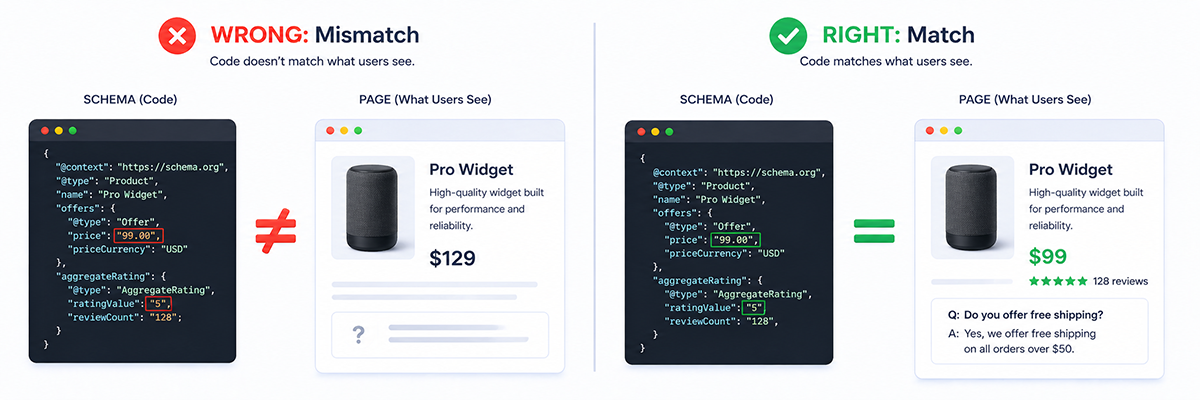
This is the most critical part of this entire guide. If you ignore this, you could actually get penalized.
The Mirror Rule: Whatever you tell the AI in the code MUST be visible to the human on the page.
Some people try to be sneaky. They use Schema to tell Google, "We have a 5-star rating!" but nowhere on the actual page can you see those 5 stars.
Google’s AI is smart. It compares your code to your text. If it sees a mismatch, it treats you like a liar. It thinks, "They are trying to trick me." Once you lose the AI's trust, it is very hard to get it back.
How to stay safe:
- If your Schema says the price is $99, make sure the text "$99" is big and bold on the page.
- If your Schema lists an FAQ question, make sure that exact question is written on the page for humans to read.
Honesty builds authority.
The "ID Card" Strategy: Proving You Are Real
In a world full of AI-generated spam, Google is desperate to know who is "real."
It uses a concept called E-E-A-T (Experience, Expertise, Authority, Trust). Schema is your way of proving these things.
You can use Organization Schema and Person Schema to create a digital ID card.
- For your Brand: "We are a Company. Here is our logo. Here are our social media profiles. Here is our customer service number."
- For your Authors: "This article was written by Sarah. She is a real Person. Here is her LinkedIn profile. Here is her degree."
When the AI sees this detailed ID card, it feels safe citing your advice because it knows there is a real human behind it.
A Simple Framework to Get Started

You don't need to overcomplicate this. Just follow this 4-step checklist for your key pages:
- Identify the Main Thing: Ask yourself, "What is the one main thing this page is about?" (A service? A product? A person? An answer?)
- Label It: Use a Schema tool (or a pro) to apply that one specific label.
- Check the Mirror: Look at the code and look at the page. Do they say the exact same thing?
- Test It: Don't just hope it works. Use Google's "Rich Results Test" tool (it's free) to make sure there are no red errors.
FAQ: Common Questions Made Simple
How do I rank higher in AI Overviews?
It’s not just about keywords anymore. It’s about being the clearest answer. Use Schema to label your content so the AI understands it instantly. If you make the AI's job easy, it rewards you.
Is Schema Markup a ranking factor?
Technically, no. It’s not like "points" in a video game. But practically, yes. It helps the AI understand you, and if it understands you, it’s more likely to show you. So it leads to better rankings indirectly.
What are the best strategies for ranking in AI search?
Focus on "Information Gain" (adding new, unique facts) and structure. Use bullet points, bold text, and Schema markup. Think of your website as a database of facts, not just a collection of stories.
What exactly is Schema Markup in AI?
Think of it as a translator. Your website speaks "Human" (text and images). Schema translates that into "Robot" (code and data), so the AI doesn't have to guess what you mean.
Final Verdict
The internet is changing from a library of links to a direct answering machine.
In this new world, clarity is king. The businesses that win won't necessarily be the ones with the biggest budgets or the oldest domains. They will be the ones that are the easiest for the AI to understand.
Schema Markup is your secret weapon to achieve that clarity. It’s the difference between mumbling at a party and handing out a crisp business card.
But let’s be real, messing around with website code can be intimidating. One missing comma can break a page, and knowing which Schema to use takes experience.
You don't have to figure this out alone.
There are specialists who live and breathe this stuff. Check out our guide on the Top 8 Freelancers Who Can Get Your Business Ranking in AI Overviews (SGE). These experts can audit your site, clean up your messy code, and implement a Schema strategy that makes your business the most trusted voice in your industry.










 Download