


You send 400 emails. Thirty-one bounce, two people reply, and now you're sitting there trying to work out whether the copy was weak or the list was junk. Both produce the same number on the dashboard.
That ambiguity is the real problem, and it is why learning how to verify an email address properly is worth an hour of your time before any send. Email remains one of the most cost-effective forms of business communication, but you can't test a subject line against a list that never reaches anybody. Verification is one of six checks, and running all six on a few hundred rows takes less time than writing the sequence did.
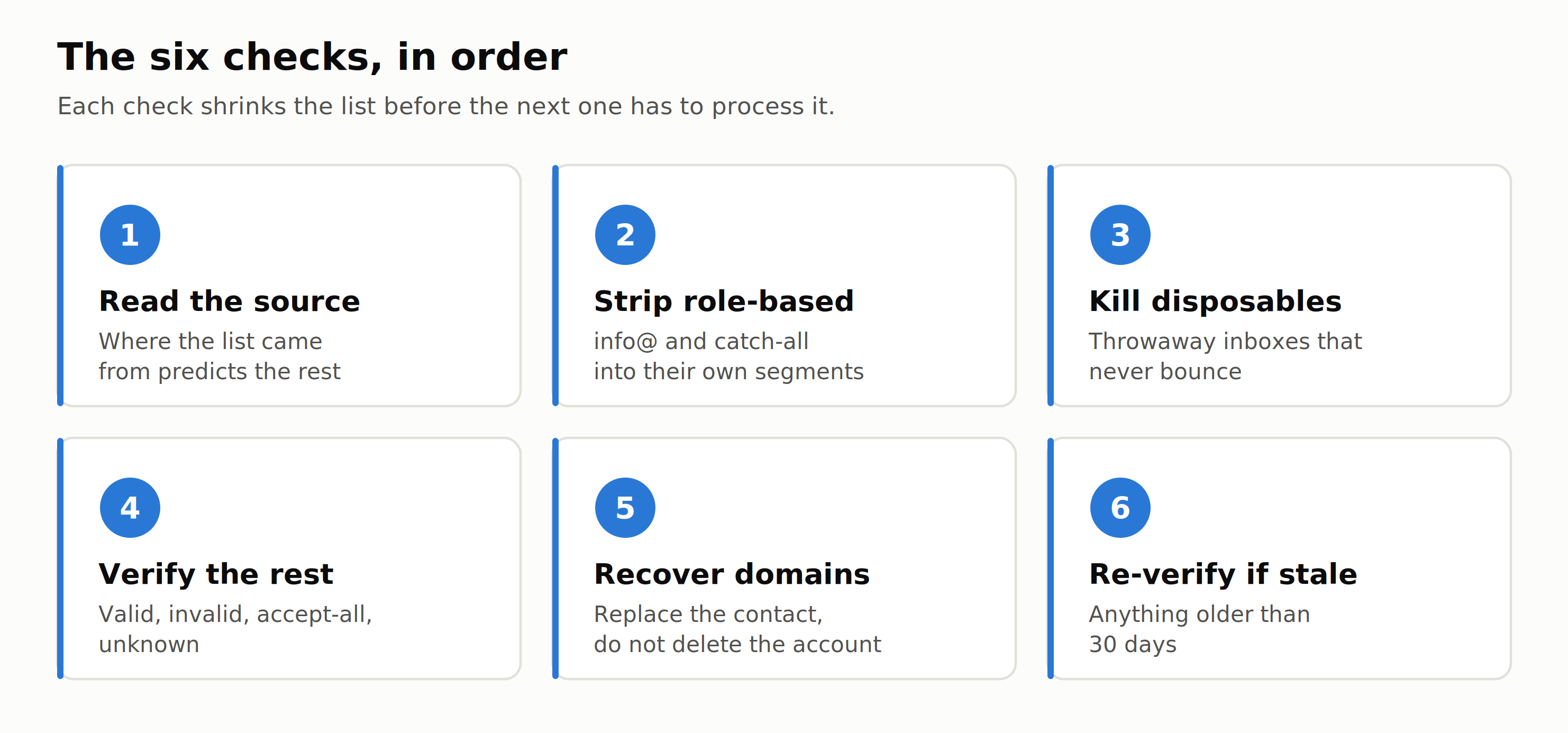
Here is the order I run them in.
Your list decides the campaign before your copy does
Bounces are scored against your sending domain, not against the campaign. That's the part people miss. One unaudited send raises the bounce rate on the same domain you use to send client proposals and invoices, and the damage sits there long after the campaign is forgotten. A reliable email sending service can help manage campaign delivery, but it can't compensate for a poor-quality list.
Google's own sender guidelines ask bulk senders to keep spam rates in Postmaster Tools below 0.3%, and say you should be aiming for under 0.10%. Those are tight margins, and you don't get to spend them finding out whether a purchased list was any good.
The sequencing argument matters more than the reputation one, though. If a fifth of your addresses are dead, your reply rate is measuring the list, not the writing. Every iteration on cold email copywriting after that point is guesswork against a broken denominator. Clean first, then test.
Check 1: Read the source before you read the list
Where a list came from predicts almost everything about how dirty it is.
A list scraped from a directory is mostly real addresses that may be years stale. A purchased list is the worst case, because it has been sold repeatedly and the good addresses were burned by whoever bought it before you. Lists built from a lead magnet carry typos and throwaway accounts. Lists built by hand from company websites, usually as part of a wider backlink outreach push, are the cleanest and always the smallest.
Then do the ninety-second version. Sort the file by domain and read the top twenty rows. If one domain holds thirty contacts, somebody scraped a directory page and padded your list. If half your B2B addresses are on gmail.com, the source was consumer data and no amount of auditing will rescue it.
Check 2: Strip the addresses that were never going to reply
Role-based addresses are the sneaky ones. info@, sales@, support@, hello@. These mailboxes genuinely exist, so they sail through verification and never bounce, which is exactly why they survive the audit and quietly wreck your reply rate. They land in a shared inbox somebody triages for customers, not for pitches.
Don't delete them. Pull them into their own segment, because for a two-person plumbing company info@ is the only inbox there is, and for a 200-person SaaS it is a black hole. Same address format, completely different odds.
Catch-all domains are the ones that confuse people, and I want to spend a moment here because the confusion is costly. A catch-all domain accepts mail addressed to anything, real mailbox or not. So when you verify an address on one, the verifier can't tell you whether the mailbox exists. It comes back accept-all, which is neither a pass nor a fail. It's an unknown, and a list stuffed with them will look beautifully clean in your export and still bounce when you press send. I've watched people treat a 96% "clean" list as a win when two-thirds of it was accept-all. Keep them separate, send to them at low volume, and never let them make up the bulk of a first send from a new domain.
Check 3: Kill the disposable domains
Disposable addresses come from services that hand you a working inbox that dies in ten minutes. They exist to get past signup forms.
If any slice of your list came from a lead magnet, a free tool, or a webinar registration, some of it is throwaway addresses left by people who wanted the file and nothing else. These are real while they last, so they accept mail and some of them even open it. They won't bounce, which means they pass every check you know how to run while contributing precisely nothing.
Run the domains in bulk through a disposable email checker rather than picking through addresses one at a time. Then delete what it flags. There's no campaign anywhere that benefits from a ten-minute inbox.
Check 4: Verify what is left
Verification isn't a spellcheck. It confirms the mailbox actually exists on the receiving server before you send anything, and it returns a result that's more useful than pass or fail.
Run whatever survived checks one to three through an email verifier, and you get one of six results back. Each one calls for a different decision.
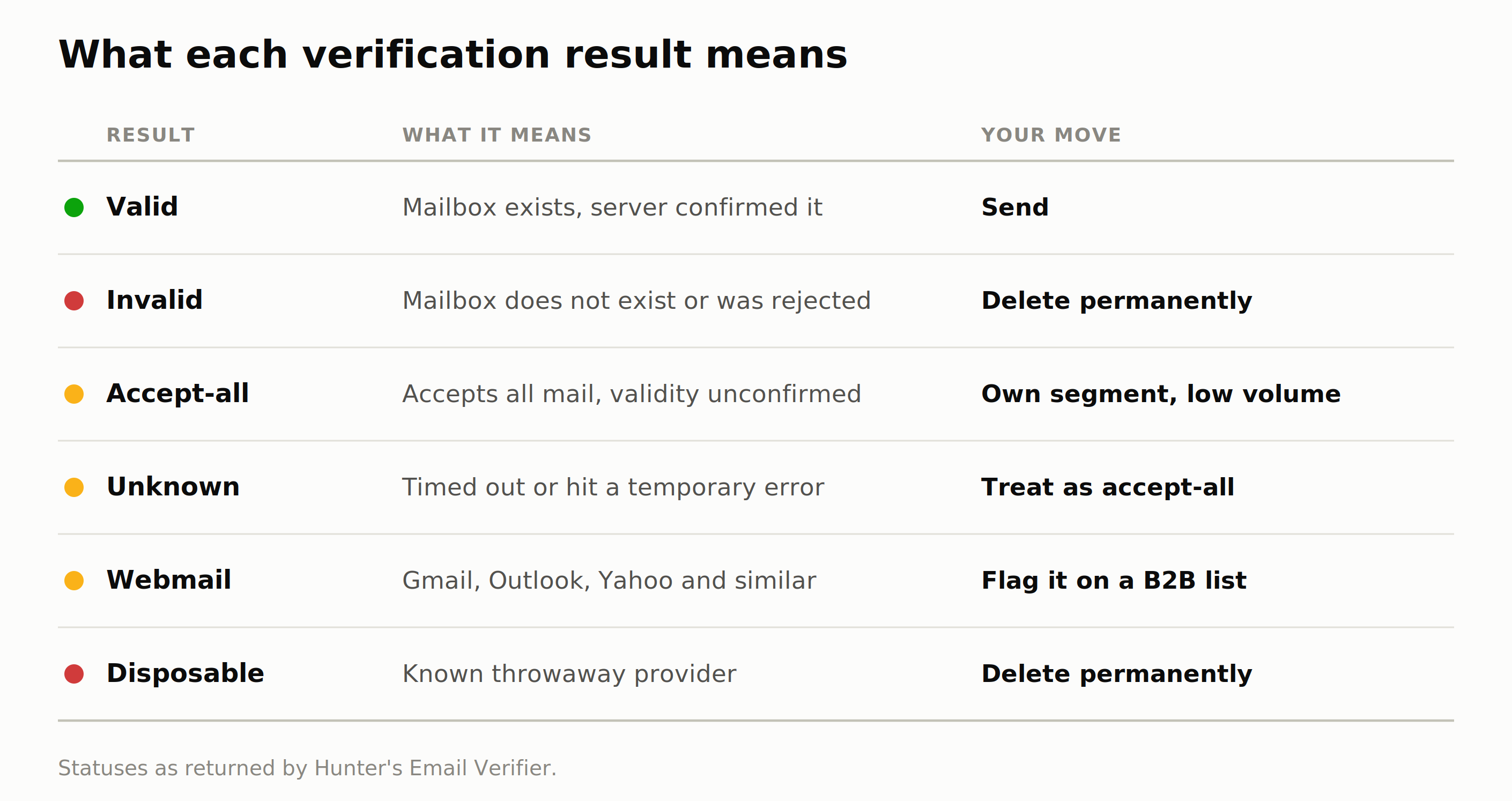
The rules I use: send to valid. Delete invalid permanently, and resist the urge to keep a "maybe" file. Segment accept-all and send to it at low volume. Treat unknown the same way you treat accept-all, because that result usually means a server didn't answer rather than an address that doesn't exist, and deleting on an unknown throws away working contacts. Flag webmail on a B2B list, since a personal Gmail for a business contact is usually a sign the data is old.
Verification also isn't magic, and it'd be dishonest to sell it that way. When we benchmarked fifteen email verifiers against 3,000 real business addresses, the best result in the group was 70% overall accuracy. That was ours. Second place was 68.37%. If the whole category tops out around seven in ten, anyone selling you 99% accuracy is describing a marketing page rather than a test, and you should still expect some bounces on a properly cleaned list.
That makes the benchmark worth knowing. In our analysis of 31 million emails sent by Hunter users in 2025, the average bounce rate was 3.6%. Land near that and your list is fine. Land at triple it and the problem is upstream in the source, and no amount of filtering will fix a list that was bad when you bought it.
Check 5: Replace the contact, do not delete the account
Every guide on cleaning lists treats the job as subtraction. You finish with a smaller file and count that as success.
A shorter list is only a win if the accounts that dropped off were not worth pitching, and usually they were. An invalid address doesn't tell you the company is a bad prospect. It tells you one person left.
So before you delete anything, pull the domains where every contact failed into their own list. You've already qualified these companies. The research is done, and the only thing missing is a working name.
Point a domain search at the company domain, and you get back the verified addresses on it with names, job titles, and departments, which means you can pick the role you actually wanted instead of guessing at firstname.lastname and hoping. That's often an upgrade rather than a repair. The row you inherited might have been a junior marketer or a generic inbox, and the replacement can be the person who signs things off. Once you have that name, the pitch is the easy part, and the same principles that work for guest post outreach apply here without much translation.
Recover the domain before you delete the row.
Check 6: Re-verify anything older than a month
Lists rot on their own. HubSpot puts the database decay rate at roughly 22.5% a year as people change jobs and companies fold.
So a list you verified in January and sent in June is carrying dead weight even though it was genuinely clean the day you built it. Re-verify before any send more than 30 days after the last check, and re-verify only the segment you are reusing rather than the whole file. Running credits against rows you cleared last week is just spending money to confirm what you already know.
What a clean list actually looks like
Role-based and accept-all sitting in their own segments. No disposable domains at all. Every domain that failed verification either recovered with a new contact or removed with a note explaining why, so you are not re-qualifying the same company in three months.
And the file is a good deal smaller than the one you started with.
That feels like a loss right up until you look at what sequence size does to reply rates. In the same 31-million-email analysis, sequences sent to 21 to 50 recipients averaged a 6.2% reply rate. Sequences sent to 500 or more averaged 2.4%.
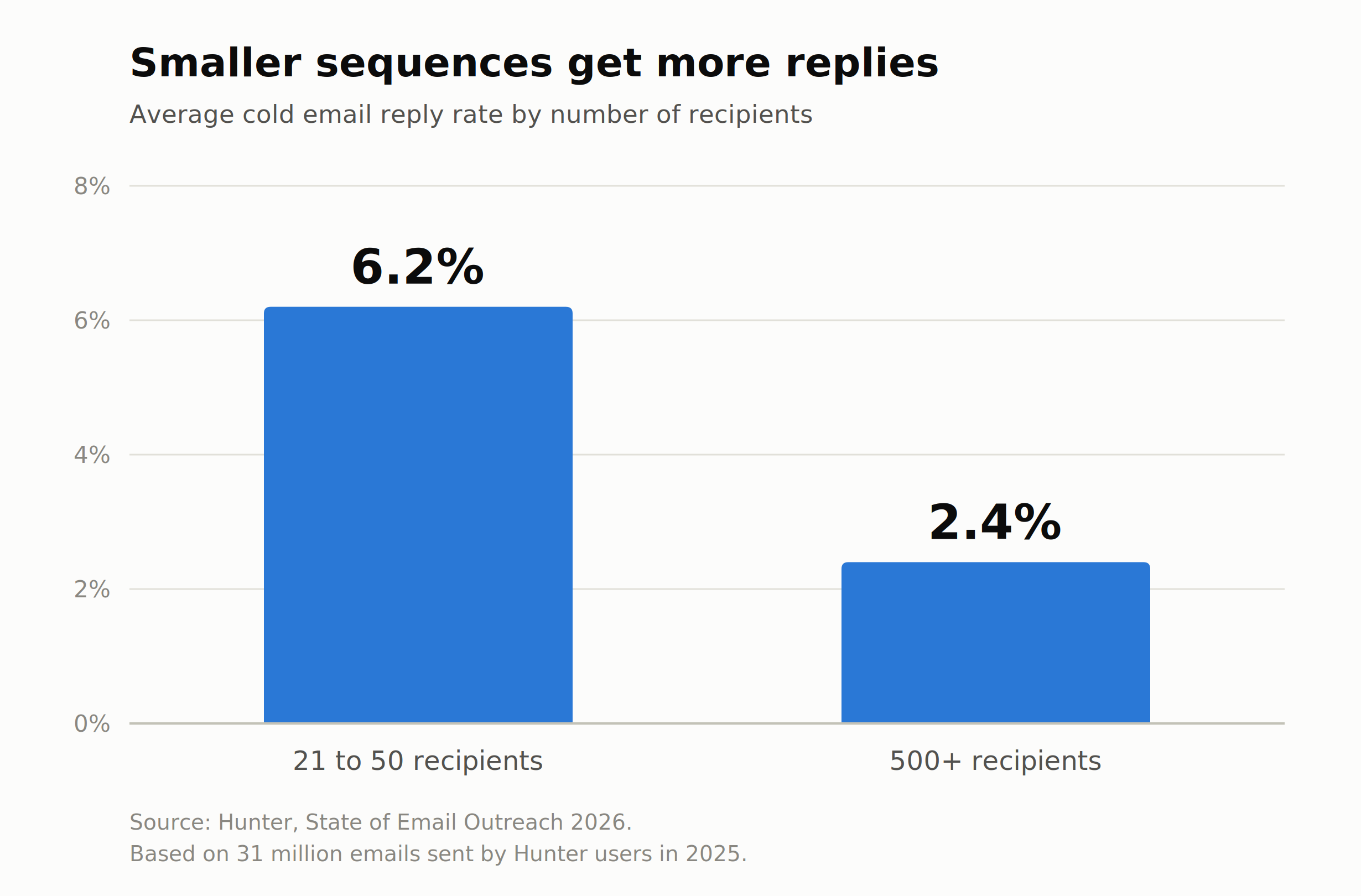
A list that shrinks by a third during this audit hasn't cost you anything. It's told you what you actually had.
Before your next send, run checks one to four on the list you were about to use and compare what survives against the number you thought you had. If the gap is big, you've found your reply rate problem, and it was never the subject line.
FAQ
How do you verify an email address without sending to it?
A verifier connects to the recipient's mail server and asks whether the mailbox exists, without delivering a message. You get a status back rather than a bounce, which is the whole point of doing it before the campaign rather than during it.
What does accept-all mean on a verification result?
The domain is set up to accept mail sent to any address, so the server can't confirm whether that specific mailbox exists. It's an unknown, not a failure. Send to these at low volume and keep them out of your main segment.
Is it worth cleaning a purchased email list?
Usually not. You can clean it, but verification only removes addresses that don't exist. It can't tell you the surviving contacts were sold to four other companies who already emailed them this quarter.
How often should a prospect list be re-verified?
Before any send more than 30 days after the last check. Re-verify the segment you're actually using, not the entire file.
What bounce rate should I expect on a cold campaign?
Across 31 million emails sent by Hunter users in 2025, the average was 3.6%. Significantly above that points to the list source rather than anything you can fix with filtering.





 Download